Rive vs Lottie vs CustomPainter: Choosing a Flutter Animation Approach
Rive, Lottie and CustomPainter all put moving vector graphics on screen, but they start from different places. Lottie plays back a timeline that a motion designer made. Rive runs an interactive graphic, with states and inputs, that a designer built in Rive's editor. A CustomPainter is animation you write in Dart.
Choosing between them is less about rendering and more about who makes the animation, how often it changes, and how much your code needs to talk to it.
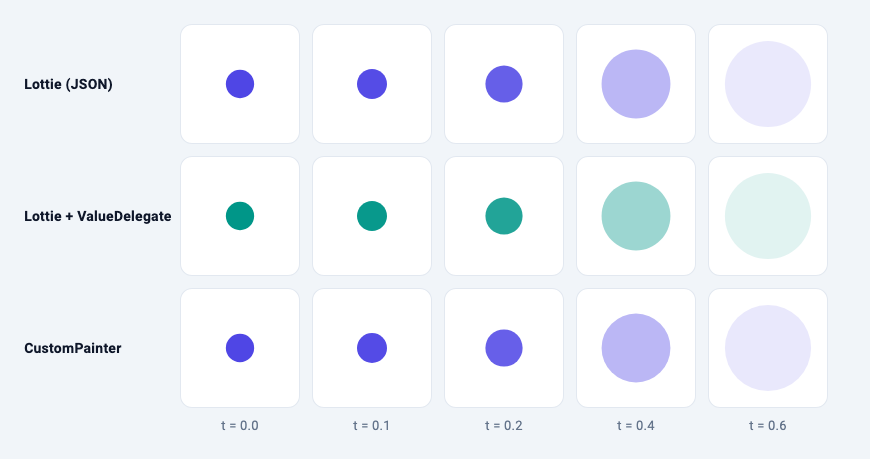
The image shows the same pulse three ways, captured at the same five progress values in a widget test: a small hand-written Lottie file, that file recoloured at runtime, and a 25-line CustomPainter. The frames match.
Code in this article passes flutter analyze with rive 0.14.11 and lottie 3.3.3 on Flutter 3.38.7. As of November 2026, 0.14.11 is the latest rive on pub.dev. The latest lottie is 3.8.2, which requires Flutter 3.47; its README shows the same Lottie.asset, controller and delegates API used here.
Quick answer
| Lottie | Rive | CustomPainter | |
|---|---|---|---|
| Made in | After Effects (exported with Bodymovin) or a Lottie editor | Rive's editor | Dart |
| File | .json (also .lottie, .tgs) |
.riv (binary) |
None |
| Flutter runtime | lottie, MIT, pure Dart |
rive, MIT, native runtime via rive_native |
Flutter SDK |
| Interactivity | Play, pause, seek; override properties at runtime | State machines, pointer listeners in the file, data binding | Whatever you code |
| Who changes it | Motion designer | Designer, exposing named properties to developers | Developer |
| Typical use | Onboarding, empty states, success and loading animations | Animated buttons, toggles, characters, game UI | Progress, charts, data-driven or procedural effects |
Lottie: designer timelines, played back
Lottie is a JSON format for vector animation. The lottie package README describes it as After Effects animations "exported as json with Bodymovin", and the Flutter package as an unofficial, pure Dart port of lottie-android that supports the same feature set. The format specification is now maintained by the Lottie Animation Community, a project hosted by the Linux Foundation.
Add it with flutter pub add lottie. The basic form loops forever:
// Plays forever, at the frame rate the file was exported at.
Lottie.asset('assets/pulse.json', width: 160, height: 160);
For control, pass your own AnimationController and size it from the file once it loads:
class _LottieOnceState extends State<LottieOnce>
    with SingleTickerProviderStateMixin {
  late final AnimationController _controller = AnimationController(vsync: this);

  @override
  void dispose() {
    _controller.dispose();
    super.dispose();
  }

  @override
  Widget build(BuildContext context) {
    return Lottie.asset(
      'assets/pulse.json',
      controller: _controller,
      onLoaded: (composition) {
        _controller
          ..duration = composition.duration
          ..forward();
      },
    );
  }
}
With the controller you can play forward, reverse, loop a range or scrub to a frame, which is how you tie a Lottie to scroll position or a pull-to-refresh gesture.
Changing it at runtime
ValueDelegates override properties by key path, built from the layer, group and shape names inside the file:
Lottie.asset(
  'assets/pulse.json',
  delegates: LottieDelegates(
    values: [
      // Key path: layer name > group name > fill name, as named in the file.
      ValueDelegate.color(const ['Dot', 'Circle', 'Fill'], value: Colors.teal),
    ],
  ),
);
That's the middle row of the image. The package has delegates for colour, opacity, position, scale, rotation, stroke width, text and more. Each one depends on the designer's layer names, so renaming a layer in the file breaks the override.
Worth knowing
- Frame rate. By default the animation plays at the frame rate it was exported at.
frameRate: FrameRate.maxuses the device rate. renderCache. Since 3.0 the widget can cache rendered frames off screen, trading memory for lower CPU and GPU use on repeated playback (per the README).- Other containers.
.lottie(dotLottie) archives load with a customdecoderbuilt onLottieComposition.decodeZip, and Telegram.tgsstickers withLottieComposition.decodeGZip.
What Lottie doesn't have is a notion of state. It is a timeline; any branching ("play the success animation, unless the request failed") lives in your Dart code.
Rive: interactive graphics with state machines
Rive is an editor plus a runtime. In the editor, a designer builds artboards, timeline animations, and state machines that decide which animation plays based on inputs and pointer events. The exported .riv file carries that logic, so a toggle can animate between on and off, respond to hover and taps, and blend states without any Dart code.
The 0.14 API
The Flutter runtime was rewritten in rive 0.14.0. Most of the runtime now lives in the rive_native package, which wraps Rive's C++ runtime. Per the official migration guide, the Rive and RiveAnimation widgets were replaced by RiveWidget and RiveWidgetBuilder, StateMachineController by StateMachine, and RiveFile by File. Tutorials written for 0.13 won't compile against 0.14.
Initialise the native runtime first:
Future<void> main() async {
  WidgetsFlutterBinding.ensureInitialized();
  await RiveNative.init();
  runApp(const MaterialApp(home: Scaffold(body: RiveSwitch())));
}
Then load a file with a FileLoader and let RiveWidgetBuilder handle the loading states:
class _RiveSwitchState extends State<RiveSwitch> {
  late final FileLoader _loader = FileLoader.fromAsset(
    'assets/switch.riv',
    riveFactory: Factory.rive,
  );

  @override
  void dispose() {
    _loader.dispose(); // also disposes the loaded File
    super.dispose();
  }

  @override
  Widget build(BuildContext context) {
    return RiveWidgetBuilder(
      fileLoader: _loader,
      // Optional: pick an artboard and state machine by name.
      artboardSelector: ArtboardSelector.byName('Switch'),
      stateMachineSelector: StateMachineSelector.byName('Main'),
      dataBind: DataBind.auto(),
      onLoaded: (state) {
        final vm = state.viewModelInstance;
        if (vm != null) updateRive(vm);
      },
      builder: (context, state) => switch (state) {
        RiveLoading() => const Center(child: CircularProgressIndicator()),
        RiveFailed() => Center(child: Text('Could not load: ${state.error}')),
        RiveLoaded() => RiveWidget(
          controller: state.controller,
          fit: Fit.contain,
        ),
      },
    );
  }
}
riveFactory picks the renderer: Factory.rive for Rive's own renderer, or Factory.flutter to draw through Flutter's renderer (Skia or Impeller), as the package README explains.
Talking to the file: data binding
Your code drives a Rive file through a view model the designer defines, with typed properties:
// Driving a Rive file from Dart through data binding. The property names
// ('isOn', 'progress', 'pulse') are whatever the designer named them in the
// file's view model.
void updateRive(ViewModelInstance vm) {
  vm.boolean('isOn')?.value = true;
  vm.number('progress')?.value = 0.75;
  vm.trigger('pulse')?.trigger();
}
Properties can also be listened to, so the file can report back to Dart. The older approach of setting state machine inputs still exists, but in 0.14 its accessor methods are marked @Deprecated and the changelog recommends data binding instead.
Worth knowing
- Native libraries.
rive_nativedownloads prebuilt native libraries duringflutter runandflutter build. Forflutter test, the README says to fetch them first withdart run rive_native:setup --platform macos(orwindows,linux). - Name clashes.
package:rive/rive.dartexports names such asAnimationandFile. In a file that also uses Flutter'sAnimation, the analyzer reports an ambiguous import; import Rive with a prefix (as rive), as the package's own example app does. - Dispose what you create. With
RiveWidgetBuilderyou only dispose theFileLoader. If you create aFileandRiveWidgetControlleryourself and useRiveWidgetdirectly, the Flutter runtime docs say you are responsible for disposing them.
When a CustomPainter beats both
Here is the pulse from the image as code. Its easing curve is the same cubic Bezier the Lottie file uses:
class PulsePainter extends CustomPainter {
  PulsePainter(this.progress, {this.color = const Color(0xFF4F46E5)})
    : super(repaint: progress);

  final Animation<double> progress; // 0..1, one pulse
  final Color color;

  static const _ease = Cubic(0.4, 0, 0.2, 1);

  @override
  void paint(Canvas canvas, Size size) {
    final t = _ease.transform(progress.value);
    final maxRadius = size.shortestSide * 0.4;
    canvas.drawCircle(
      size.center(Offset.zero),
      maxRadius * (0.3 + 0.7 * t),
      Paint()..color = color.withValues(alpha: 1 - t),
    );
  }

  @override
  bool shouldRepaint(PulsePainter oldDelegate) =>
      oldDelegate.progress != progress || oldDelegate.color != color;
}
Drive it with a repeating controller:
class _PulseState extends State<Pulse> with SingleTickerProviderStateMixin {
  late final AnimationController _controller = AnimationController(
    vsync: this,
    duration: const Duration(seconds: 2),
  )..repeat();

  @override
  void dispose() {
    _controller.dispose();
    super.dispose();
  }

  @override
  Widget build(BuildContext context) {
    return CustomPaint(
      size: const Size(160, 160),
      painter: PulsePainter(_controller),
    );
  }
}
Passing the animation to super(repaint:) repaints the painter on every tick without rebuilding the widget. If that's new, see why a CustomPainter repaints every frame.
Code is the better tool when:
- The animation is driven by data. A progress ring, a chart that grows, an audio level meter. The values come from your app, not from a timeline. See the gradient progress ring or animating path drawing with PathMetric.
- It's procedural. Particles, waves, confetti with random positions. A timeline file can only replay what was authored.
- It has to follow your theme. Colours, sizes and text come straight from
Theme.of(context)with no key paths or view models in between. - It's small. A few shapes and one easing curve don't justify an asset, a loader and a dependency.
Code loses when the animation is the designer's work: character animation, intricate morphs, anything that changes after a review meeting. Rebuilding a 200-layer After Effects composition in Dart, then again after every revision, costs far more than shipping the file.
Pricing and licensing
As of November 2026:
- Runtimes. Both Flutter runtimes are MIT licensed. Rive's pricing page states "no runtime fees" and "MIT open-source runtimes".
- Rive editor. The Free plan lists "Export .riv files with a splash screen" and 3 collaborative files. The Cadet plan, $9 per seat per month, lists "Export .riv files without the splash screen" and unlimited files. Higher tiers are $32 (Voyager) and $120 (Enterprise) per seat per month. Check the page before you commit; plan details change.
- Lottie. The format is an open specification. Files are commonly exported from Adobe After Effects, a commercial Adobe product, through the Bodymovin plugin. Dedicated Lottie tools exist too: LottieFiles' pricing page lists paid plans from $19.99 per user per month, billed annually.
Which one should you use?
- A designer delivers a finished animation that plays the same way every time? Lottie.
- The animation has states, reacts to touch, or your code needs to set values inside it? Rive.
- The motion comes from your data, follows your theme, or is a handful of shapes? A
CustomPainter.
Mixing is normal. An app can use Lottie for its onboarding, a Rive file for an animated tab bar and a CustomPainter for its progress indicators.
Related articles
Explore Our Projects
Beyond the shape tools — two more things we build and use every day. Free to try, no signup.
Keyboard Arena
Typing practice that plays like a game
Real-time WPM tests, mechanical switch audio, A-Z finger drills and 40+ structured lessons. Race a ghost of your best run instead of grinding random words.
- ✓ Live WPM & Accuracy
- ✓ Mechanical Switch Audio
- ✓ 40+ Guided Lessons
Flutter Log Explorer
Finally, Flutter logs you can read
Zero-config, real-time log capture from the Debug Adapter and Dart VM Service, with smart classification, filters and deduplication — all inside VS Code.
- ✓ Zero-Config Capture
- ✓ Smart Filters & Search
- ✓ Noise-Free Deduplication
Ready to Design Your Own Shapes?
Open the editor and start creating professional Flutter CustomPainter code visually.
Open the Editor