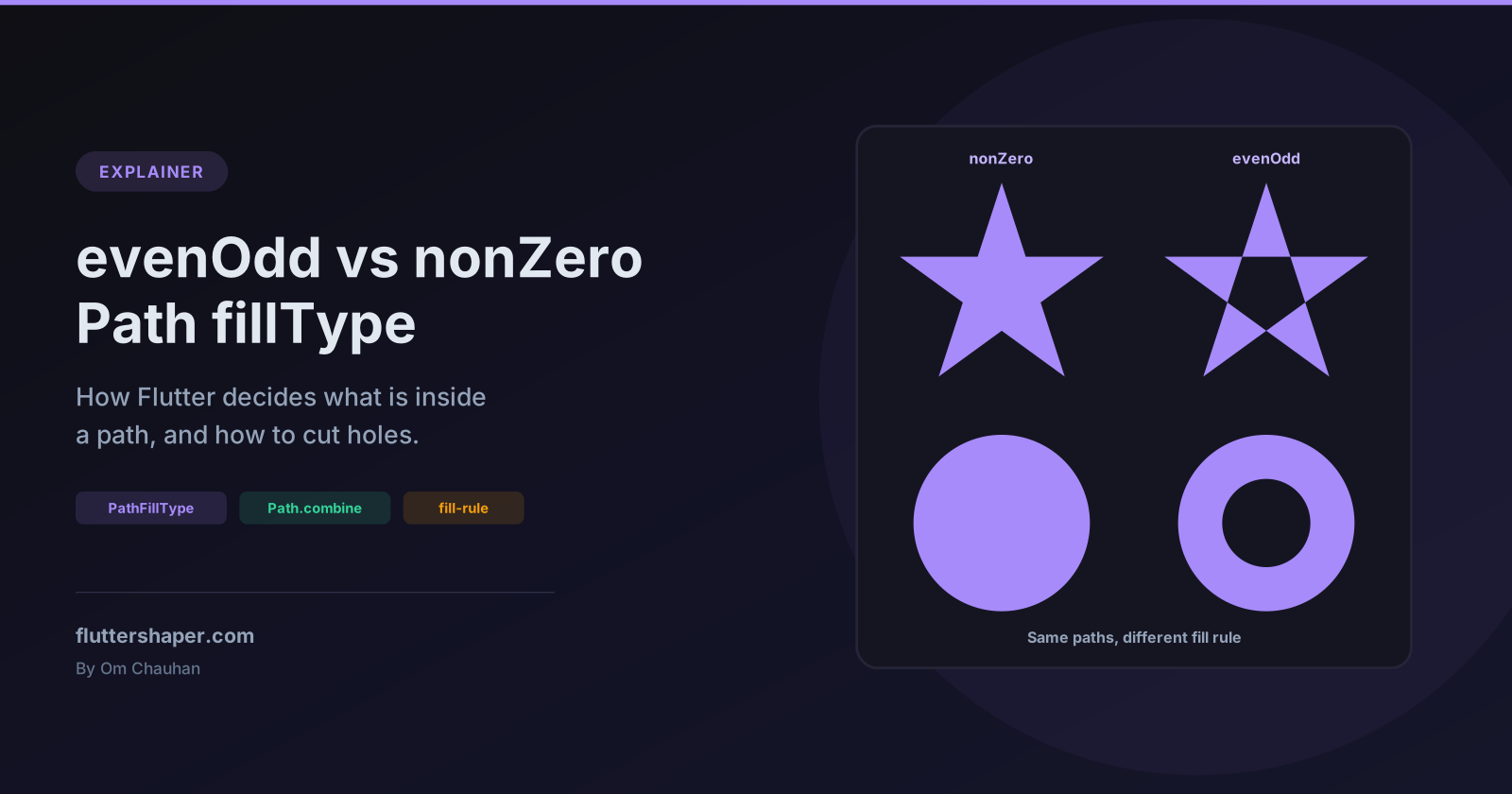
Flutter Path fillType: evenOdd vs nonZero Explained
A simple path, like a rectangle or a circle, has an obvious inside. Once a path crosses itself, or one shape sits inside another, "inside" needs a rule. Flutter's Path.fillType picks one of two: PathFillType.nonZero, the default, or PathFillType.evenOdd.
The choice explains some common surprises: a ring drawn from two circles with no hole, a star with a filled centre, and an SVG icon whose holes fill in after conversion. Every result below comes from a widget test or a golden render.
The two rules
Both rules start the same way. To decide whether a point is inside, imagine a ray from that point out to infinity, in any direction, and look at every edge of the path it crosses.
- evenOdd counts the crossings. An odd number means inside, an even number means outside. Which way each edge runs doesn't matter.
- nonZero adds +1 for every edge that crosses the ray going one way around the point and −1 for every edge going the other way. The total is the winding number. Anything other than zero means inside.
The dart:ui docs describe nonZero as: inside "if a line drawn from the point to infinity crosses lines going clockwise around the point a different number of times than it crosses lines going counter-clockwise around that point." Path().fillType is PathFillType.nonZero unless you change it, which a test confirms.
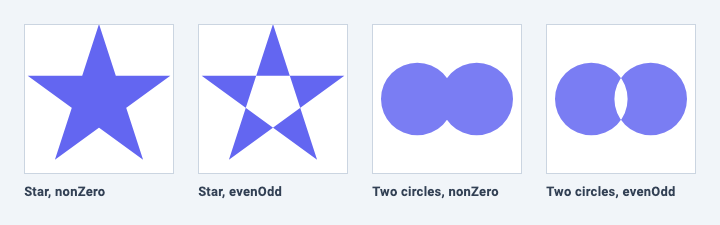
Applied to the shapes in the image:
| Point | Crossings (ray to the right) | Winding number | nonZero | evenOdd |
|---|---|---|---|---|
| Centre of the star | 2 | 2 (both edges run the same way) | Filled | Empty |
| Overlap of the two circles | 2 | 2 (both circles run the same way) | Filled | Empty |
| One arm of the star | 1 | 1 | Filled | Filled |
The star is drawn as a single closed polygon that visits every second point of a pentagon, so its outline crosses itself:
Path starPath(Offset center, double radius) {
  // Visit every second point of a pentagon: the outline crosses itself.
  final points = [
    for (var i = 0; i < 5; i++)
      center + Offset.fromDirection(-math.pi / 2 + i * 4 * math.pi / 5, radius),
  ];
  return Path()..addPolygon(points, true);
}

class StarPainter extends CustomPainter {
  const StarPainter({required this.fillType});
  final PathFillType fillType;

  @override
  void paint(Canvas canvas, Size size) {
    final star = starPath(size.center(Offset.zero), size.shortestSide / 2)
      ..fillType = fillType;
    canvas.drawPath(star, Paint()..color = const Color(0xFF6366F1));
  }

  @override
  bool shouldRepaint(StarPainter oldDelegate) => oldDelegate.fillType != fillType;
}
(math is import 'dart:math' as math;.) Rendered to an image, the centre pixel is fully opaque with nonZero and fully transparent with evenOdd.
Why direction matters for nonZero and not for evenOdd
Here is the most common surprise. Two circles, one inside the other, should make a ring:
// Meant to be a ring, but the hole is filled in.
Path brokenRing(Offset c) => Path()
  ..addOval(Rect.fromCircle(center: c, radius: 60))
  ..addOval(Rect.fromCircle(center: c, radius: 30));
It draws a solid disc, and brokenRing(c).contains(c) returns true. addOval has no direction parameter, so both circles run the same way. A ray from the centre crosses both circles going the same way around the point: winding number 2, which nonZero fills.
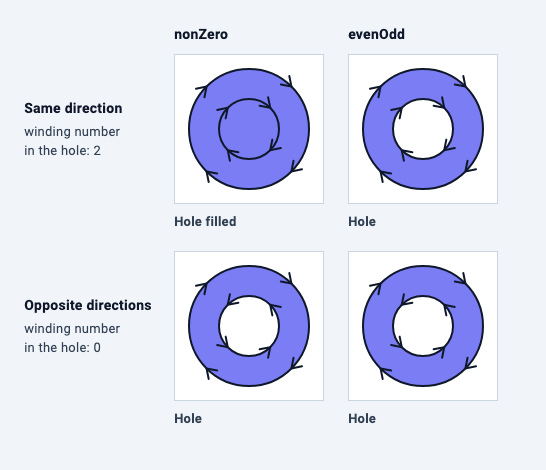
The grid shows all four combinations. With evenOdd, the ray crosses two edges either way, an even number, so the hole is always empty. With nonZero, the result depends on direction: the same direction gives 1 + 1 = 2 (filled), opposite directions give 1 − 1 = 0 (hole).
That's the whole difference in one line: evenOdd ignores direction, nonZero depends on it.
Three ways to cut a hole on purpose
1. Switch to evenOdd
// Fix 1: even-odd. Direction no longer matters.
Path evenOddRing(Offset c) => Path()
  ..fillType = PathFillType.evenOdd
  ..addOval(Rect.fromCircle(center: c, radius: 60))
  ..addOval(Rect.fromCircle(center: c, radius: 30));
One line, and it works regardless of how each contour was built. The cost is that every overlap becomes a hole, as the two-circle panel in the first image shows. If the same path also contains pieces that overlap on purpose, they get punched out too.
2. Keep nonZero and reverse the inner contour
addOval doesn't let you choose a direction, but arcToPoint does. A full circle is two half arcs:
/// A full circle drawn as two half arcs, in the direction you choose.
Path circlePath(Offset c, double r, {bool clockwise = true}) => Path()
  ..moveTo(c.dx + r, c.dy)
  ..arcToPoint(Offset(c.dx - r, c.dy), radius: Radius.circular(r), clockwise: clockwise)
  ..arcToPoint(Offset(c.dx + r, c.dy), radius: Radius.circular(r), clockwise: clockwise)
  ..close();

// Fix 2: keep nonZero, run the inner circle the other way.
Path nonZeroRing(Offset c) => Path()
  ..addPath(circlePath(c, 60), Offset.zero)
  ..addPath(circlePath(c, 30, clockwise: false), Offset.zero);
A test also shows that addOval runs the same way as circlePath(clockwise: true), so an addOval outer circle with a clockwise: false inner circle makes a hole too.
For polygons, direction is simply the order of the points. Reverse the list for the inner contour:
// For polygons, the direction is simply the order of the points.
Path frame(List<Offset> outer, List<Offset> inner) => Path()
  ..addPolygon(outer, true)
  ..addPolygon(inner.reversed.toList(), true);
The advantage over evenOdd: holes appear only where you reversed a contour. Other overlapping pieces that run the same way stay filled.
3. Subtract with Path.combine
// Fix 3: subtract one shape from the other.
Path differenceRing(Offset c) => Path.combine(
      PathOperation.difference,
      Path()..addOval(Rect.fromCircle(center: c, radius: 60)),
      Path()..addOval(Rect.fromCircle(center: c, radius: 30)),
    );
Path.combine computes a new outline from two paths, so direction stops mattering: both circles here come from addOval and the hole still appears. It also supports union, intersect, xor and reverseDifference, which makes it the right tool when shapes are built separately and combined later.
One detail from a test: the path it returns reports PathFillType.evenOdd. That's harmless for the result itself, but if you add more contours to it afterwards, they follow the even-odd rule.
Which one to use
| evenOdd | Reverse inner contour | Path.combine |
|
|---|---|---|---|
| Code change | One line | Build the inner contour backwards | Two paths and one call |
| Overlapping pieces | Become holes | Stay filled unless reversed | Whatever the operation says |
| Works on a path you didn't build (parsed SVG) | Yes | Only if you can rebuild it | Yes |
| Result | Same path, different rule | Same path | A new path |
All three produce the same ring: in a test, each returns false for contains at the centre and true inside the band.
What fillType changes, and what it doesn't
| Operation | Uses fillType? | Checked by |
|---|---|---|
canvas.drawPath with a fill |
Yes | Golden render and pixel test |
Path.contains (and hit testing built on it) |
Yes | Unit test |
ClipPath clipping |
Yes, the hole is see-through | Pixel test |
ClipPath hit testing |
Yes, taps in the hole don't register | Widget test |
canvas.drawPath with PaintingStyle.stroke |
No | Identical pixels for both rules |
The last row is worth remembering when debugging: a stroke draws every edge whatever the rule, so outlining a path won't reveal a fill-type problem. Fill it to see what Flutter considers inside. If you hit-test your shapes, the rule applies there too; see making taps respect your custom shape.
A practical use: a spotlight overlay
Onboarding screens often dim everything except one widget. That's a full-screen rectangle with a rounded hole, and evenOdd makes it a few lines:
class SpotlightPainter extends CustomPainter {
  SpotlightPainter(Rect target)
      : hole = RRect.fromRectAndRadius(target.inflate(8), const Radius.circular(12));
  final RRect hole;

  @override
  void paint(Canvas canvas, Size size) {
    final overlay = Path()
      ..fillType = PathFillType.evenOdd
      ..addRect(Offset.zero & size)
      ..addRRect(hole);
    canvas.drawPath(overlay, Paint()..color = const Color(0xB3000000));
  }

  // Taps inside the hole fall through to the highlighted widget.
  @override
  bool? hitTest(Offset position) => !hole.contains(position);

  @override
  bool shouldRepaint(SpotlightPainter oldDelegate) => oldDelegate.hole != hole;
}

Remove the fillType line and the hole disappears: addRect and addRRect run the same way, so the hole has a winding number of 2. A test confirms the nonZero version contains the hole's centre.
The hitTest override makes the overlay feel right. Put the painter in a Stack above the screen, inside a GestureDetector that dismisses it: in a test, a tap inside the hole reaches the button underneath, and a tap anywhere else dismisses the overlay. target is the highlighted widget's rectangle in the overlay's coordinates.
From SVG: fill-rule
SVG has the same two rules under different names, set with the fill-rule attribute (or CSS property):
| SVG | Flutter |
|---|---|
fill-rule="nonzero" (the SVG default) |
PathFillType.nonZero (the Flutter default) |
fill-rule="evenodd" |
PathFillType.evenOdd |
clip-rule="evenodd" on a clip path's shapes |
fillType = PathFillType.evenOdd on the clip Path |
The defaults match, so most icons convert without thought. The exception is an icon that depends on fill-rule="evenodd" for its holes. The rule isn't part of the d path data; it's a separate attribute. If you copy only the d string into a converter or translate it by hand, the holes fill in. Set the fill type yourself:
// <path fill-rule="evenodd" d="M2 2H22V22H2Z M8 8H16V16H8Z"/>
final squareIcon = Path()
  ..fillType = PathFillType.evenOdd // from fill-rule="evenodd"
  ..addRect(const Rect.fromLTRB(2, 2, 22, 22))
  ..addRect(const Rect.fromLTRB(8, 8, 16, 16));
Both squares in that SVG run the same way, and so do the two addRect calls. Without the fillType line, a test shows the centre of the icon is filled.
Summary
nonZerois the default in both Flutter and SVG. It fills any point with a non-zero winding number, so direction matters.evenOddfills points with an odd number of crossings. Direction never matters, and every overlap becomes a hole.- A ring made from two
addOvalcalls has no hole undernonZero. UseevenOdd, reverse the inner contour, orPath.combine(PathOperation.difference, ...). - Fill type affects fills, clips,
containsand hit testing, but never strokes. - When converting SVG, carry
fill-rule="evenodd"over by hand.
Related articles
Explore Our Projects
Beyond the shape tools — two more things we build and use every day. Free to try, no signup.
Keyboard Arena
Typing practice that plays like a game
Real-time WPM tests, mechanical switch audio, A-Z finger drills and 40+ structured lessons. Race a ghost of your best run instead of grinding random words.
- ✓ Live WPM & Accuracy
- ✓ Mechanical Switch Audio
- ✓ 40+ Guided Lessons
Flutter Log Explorer
Finally, Flutter logs you can read
Zero-config, real-time log capture from the Debug Adapter and Dart VM Service, with smart classification, filters and deduplication — all inside VS Code.
- ✓ Zero-Config Capture
- ✓ Smart Filters & Search
- ✓ Noise-Free Deduplication
Ready to Design Your Own Shapes?
Open the editor and start creating professional Flutter CustomPainter code visually.
Open the Editor