Boolean Operations: Unite, Subtract, Intersect & Exclude Shapes in Flutter
Creating complex forms in Flutter often means combining simpler forms together. An effective flutter shape maker allows you to seamlessly integrate these elements. For example, a speech bubble is a rectangle merged with a triangle. A donut is a circle with another circle subtracted from its center. A badge is the intersection of two overlapping forms.
Flutter Shape Builder, the premier flutter shaper tool, provides four boolean operations that let you combine forms visually and export the result as a single, clean flutter path shape or flutter custom painter shape. These operations are powered by the Paper.js computational geometry engine for pixel-perfect accuracy.
The four boolean operations
Unite (Merge)
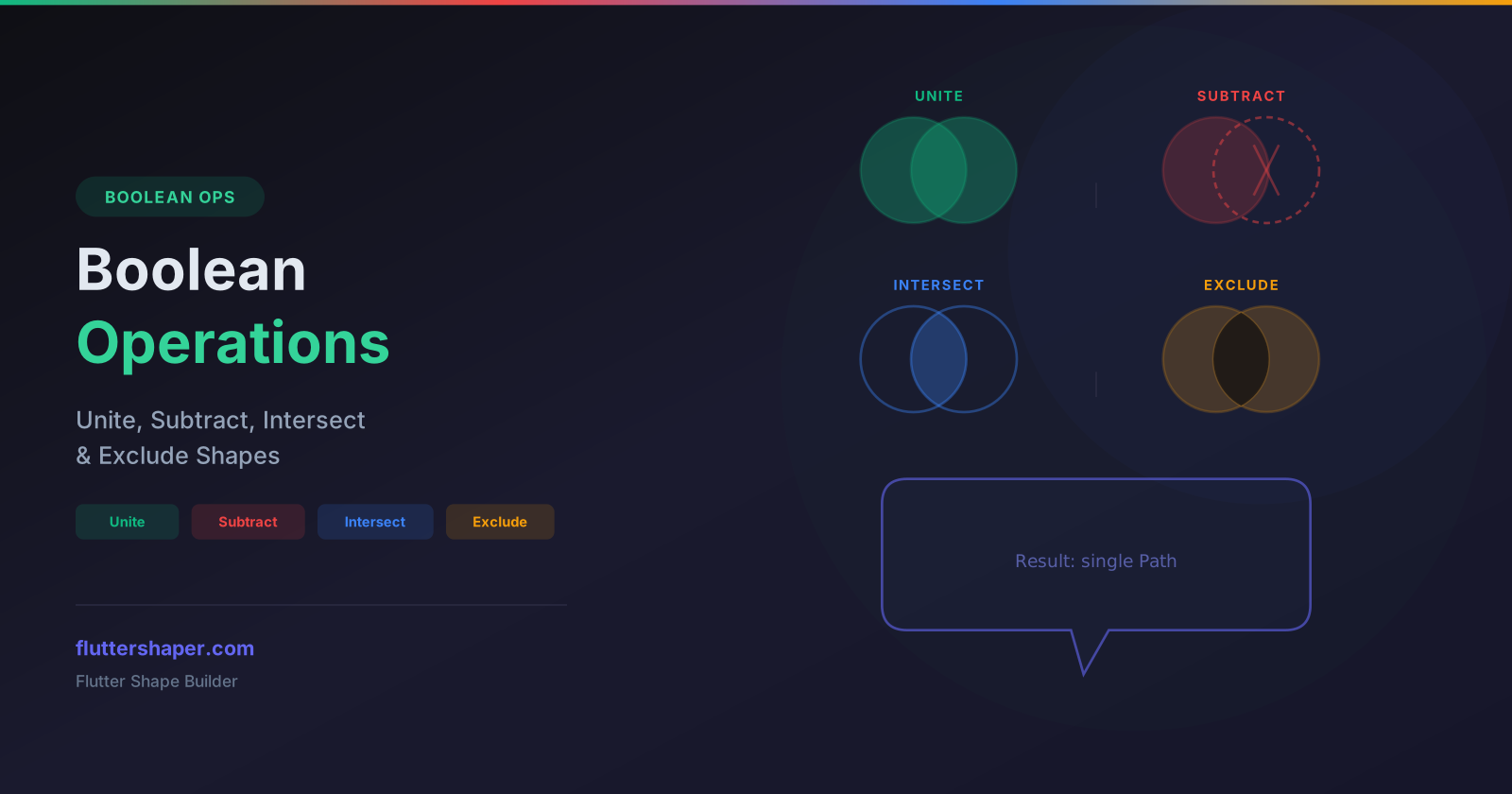
The Unite operation merges two or more overlapping shapes into a single combined flutter shape. The result is the outer boundary of all selected shapes combined.
Use cases: speech bubbles, complex silhouettes, merged UI elements, logos with connected parts.
// Before: two separate shapes
// After unite: one merged path
final mergedPath = Path();
mergedPath.moveTo(50.0, 50.0);
// ... combined outline coordinates
mergedPath.close();
canvas.drawPath(mergedPath, paint);
Subtract (Cut)
The Subtract operation cuts one shape out of another, like a cookie cutter. Select two shapes — the first shape is the base, and the second shape is removed from it.
Use cases: donut shapes, cutout effects, keyhole shapes, notched containers, ring indicators.
Intersect (Overlap)
The Intersect operation keeps only the area where all selected shapes overlap. Everything outside the intersection is removed.
Use cases: Venn diagram overlaps, clipped shapes, masked regions, cropped elements.
Exclude (XOR)
The Exclude operation keeps everything except the overlapping region. It is the inverse of Intersect.
Use cases: frame effects, inverted masks, decorative patterns, hollow logo shapes.
How to use boolean operations
- Draw two or more specific flutter shapes using the Rectangle, Circle, Polygon, or Pen tools
- Select multiple shapes by holding Shift and clicking each shape
- Choose an operation from the toolbar — Unite, Subtract, Intersect, or Exclude
- The objects are combined into a single new flutter custom shape with the result of the operation
The resulting flutter shape is a standard path that you can further edit, style, or export as Flutter code.
Under the hood: Paper.js geometry engine
Boolean operations on vector paths are computationally complex. Flutter Shape Builder uses Paper.js, a battle-tested open-source vector graphics library, to perform these calculations with precision. Paper.js handles edge cases like tangent intersections, self-intersecting paths, and floating-point rounding that would be extremely difficult to implement from scratch.
The workflow internally:
- Your canvas shapes are converted to Paper.js path representations
- Paper.js computes the boolean operation (unite, subtract, intersect, or exclude)
- The resulting path is converted back to SVG commands
- Those commands are displayed on the canvas and translated to Flutter Dart code
Practical examples
Creating a speech bubble
- Draw a rounded rectangle for the bubble body
- Draw a small triangle for the tail pointer
- Select both shapes and click Unite
- Result: a single path representing a complete speech bubble
Creating a ring / donut
- Draw a large circle (outer ring)
- Draw a smaller circle centered inside (inner cutout)
- Select both and click Subtract
- Result: a ring shape with a hollow center
Creating a badge with cutout
- Draw a hexagon for the badge shape
- Draw a star or icon shape on top
- Select both and click Exclude
- Result: a hexagonal badge with the icon shape cut through it
Flutter Path.combine comparison
Flutter's built-in Path.combine() method supports PathOperation.union, PathOperation.difference, PathOperation.intersect, and PathOperation.xor. Flutter Shape Builder pre-computes these operations at design time, so your exported code contains just the final path coordinates — no runtime computation needed. This results in faster rendering and simpler code.
Combine shapes visually
Draw overlapping shapes, select them, and apply boolean operations. Export the result as clean Flutter code.
Related articles
Explore Our Projects
Beyond the shape tools — two more things we build and use every day. Free to try, no signup.
Keyboard Arena
Typing practice that plays like a game
Real-time WPM tests, mechanical switch audio, A-Z finger drills and 40+ structured lessons. Race a ghost of your best run instead of grinding random words.
- ✓ Live WPM & Accuracy
- ✓ Mechanical Switch Audio
- ✓ 40+ Guided Lessons
Flutter Log Explorer
Finally, Flutter logs you can read
Zero-config, real-time log capture from the Debug Adapter and Dart VM Service, with smart classification, filters and deduplication — all inside VS Code.
- ✓ Zero-Config Capture
- ✓ Smart Filters & Search
- ✓ Noise-Free Deduplication
Ready to Design Your Own Shapes?
Open the editor and start creating professional Flutter CustomPainter code visually.
Open the Editor