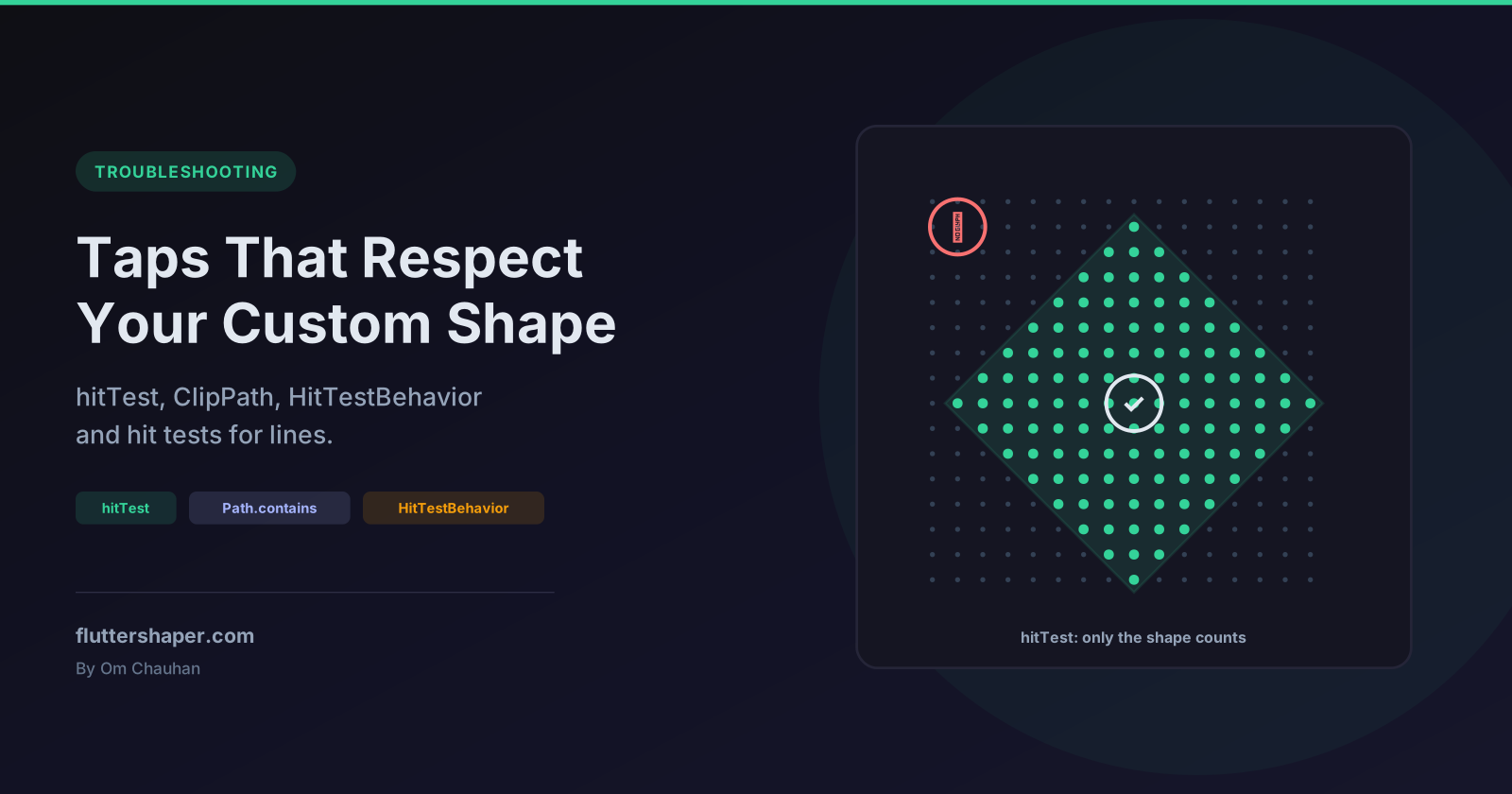
Make Taps Respect Your Custom Shape in Flutter
You paint a diamond, a star or a blob, wrap it in a GestureDetector, and taps in the empty corners still fire. Flutter's hit testing works on rectangles unless something tells it otherwise, and a CustomPaint doesn't tell it anything by default.
Fixing it takes a little more than overriding hitTest: the obvious override has a bug that only shows up after a rebuild, lines need a different test from filled shapes, and the wrong HitTestBehavior undoes everything. Each behaviour described here is checked in a widget test.
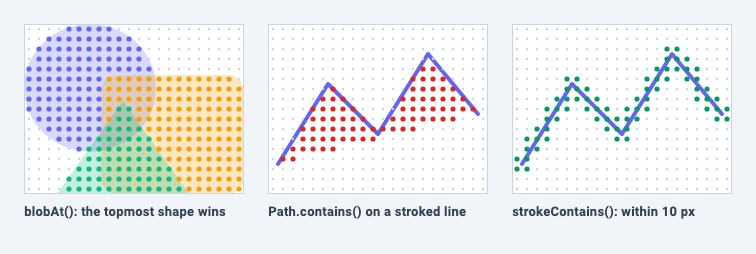
In the image, each dot is a real hit test at that point. On the left, overlap areas take the colour of the shape painted on top. In the middle, Path.contains on a stroked line reports hits in the empty area under the line and misses the half of the stroke that lies outside that area. On the right, a distance check hits only near the line.
How a tap reaches a CustomPaint
When a pointer goes down, Flutter asks each render object whether the point hits it. For a CustomPaint, the checks run in this order:
- Is the point inside the box? If not, it's a miss and nothing else runs. A zero-size
CustomPaintcan never be hit (see CustomPaint size is zero). - The foreground painter's
hitTest. If it returnstrue, theCustomPaintis hit and the child is skipped. - The child, if there is one.
- The background painter's
hitTest. If it returnsnull, the default, the point counts as a hit.
The Flutter docs sum up the defaults: "consider all points to be hits for background painters, and no points to be hits for foreground painters." In practice:
| Setup | Result for a tap inside the box |
|---|---|
painter:, no hitTest override |
Hit everywhere, including empty corners |
foregroundPainter:, no override, no child |
Never hit |
foregroundPainter: with a child |
Hit wherever the child is hit |
Foreground hitTest returns true |
Hit, and the child never sees the tap |
Background hitTest returns false, with a child |
Still hit where the child is hit |
So a plain background painter is the reason taps land in the corners. You fix that by returning false for points outside your shape.
Overriding hitTest, and the trap in caching the size
hitTest(Offset position) receives the point in the painter's own coordinates and returns true, false or null. What it doesn't receive is the size, and most shapes are built from the size. The common workaround is to remember the size from paint() (diamondPath is defined in the next section):
// Don't do this: hitTest only works until the next rebuild.
class CachedSizeDiamondPainter extends CustomPainter {
  CachedSizeDiamondPainter({required this.color});
  final Color color;
  Size _size = Size.zero;

  @override
  void paint(Canvas canvas, Size size) {
    _size = size;
    canvas.drawPath(diamondPath(size), Paint()..color = color);
  }

  @override
  bool? hitTest(Offset position) => diamondPath(_size).contains(position);

  @override
  bool shouldRepaint(CachedSizeDiamondPainter oldDelegate) => oldDelegate.color != color;
}
It works on the first screen and breaks later. Each time the parent rebuilds, CustomPaint gets a new painter instance. If shouldRepaint returns false, Flutter keeps the existing picture and never calls paint() on the new instance, so its _size is still Size.zero. Every hit test now misses.
A widget test shows it directly: a tap in the centre of the diamond fires onTap. Rebuild the same widget with the same colour, tap the same spot, and nothing fires. Because anything else that repaints the area restores _size, the bug in a real app looks intermittent.
The rule: hitTest should only use data the painter received in its constructor, never state written during paint(). There are two clean ways to get there.
One shape: use ClipPath as a tap mask
ClipPath already hit-tests against its path, and its clipper receives the current size on every layout. That makes it a ready-made tap mask:
Path diamondPath(Size size) => Path()
  ..moveTo(size.width / 2, 0)
  ..lineTo(size.width, size.height / 2)
  ..lineTo(size.width / 2, size.height)
  ..lineTo(0, size.height / 2)
  ..close();

class DiamondPainter extends CustomPainter {
  const DiamondPainter({required this.color});
  final Color color;

  @override
  void paint(Canvas canvas, Size size) {
    canvas.drawPath(diamondPath(size), Paint()..color = color);
  }

  @override
  bool shouldRepaint(DiamondPainter oldDelegate) => oldDelegate.color != color;
}

class DiamondClipper extends CustomClipper<Path> {
  const DiamondClipper();

  @override
  Path getClip(Size size) => diamondPath(size);

  @override
  bool shouldReclip(DiamondClipper oldClipper) => false;
}

class DiamondButton extends StatelessWidget {
  const DiamondButton({super.key, required this.onTap});
  final VoidCallback onTap;

  @override
  Widget build(BuildContext context) {
    return GestureDetector(
      onTap: onTap,
      child: const ClipPath(
        clipper: DiamondClipper(),
        clipBehavior: Clip.none, // hit test against the path, but don't clip
        child: CustomPaint(painter: DiamondPainter(color: Colors.indigo)),
      ),
    );
  }
}
Two details make this work:
RenderClipPath.hitTestreturnsfalsefor any point outside the clipper's path, before the child is even asked. Taps in the corners never reach theGestureDetector.- With
clipBehavior: Clip.none,RenderClipPath.paintpaints the child without pushing a clip, so you get the path-accurate hit test without paying for clipping. The painter already draws the exact shape, so there's nothing to clip.
In a test, a tap in the corner of a 200 × 200 DiamondButton doesn't fire, a tap in the centre does, and it keeps working after rebuilds. If the child is something that needs cutting to shape, such as a photo, leave clipBehavior at its default Clip.antiAlias. The hit test is the same either way.
Several shapes: which one was tapped?
When one painter draws several shapes, a plain true isn't enough. You need the index of the shape under the finger, and the tap handler needs the same paths the painter drew. Build the paths outside the painter so both can use them:
class Blob {
  const Blob(this.path, this.color);
  final Path path;
  final Color color;
}

int? blobAt(List<Blob> blobs, Offset position) {
  // The last blob painted is on top, so test in reverse paint order.
  for (var i = blobs.length - 1; i >= 0; i--) {
    if (blobs[i].path.contains(position)) return i;
  }
  return null;
}

class BlobPainter extends CustomPainter {
  BlobPainter({required this.blobs, required this.selected});
  final List<Blob> blobs;
  final int? selected;

  @override
  void paint(Canvas canvas, Size size) {
    for (var i = 0; i < blobs.length; i++) {
      canvas.drawPath(blobs[i].path, Paint()..color = blobs[i].color);
      if (i == selected) {
        canvas.drawPath(
          blobs[i].path,
          Paint()
            ..style = PaintingStyle.stroke
            ..strokeWidth = 4
            ..color = const Color(0xFF0F172A),
        );
      }
    }
  }

  @override
  bool? hitTest(Offset position) => blobAt(blobs, position) != null;

  @override
  bool shouldRepaint(BlobPainter oldDelegate) =>
      oldDelegate.blobs != blobs || oldDelegate.selected != selected;
}
buildBlobs(Size size) is whatever builds your shapes; in the example it returns an oval, a rounded rectangle and a triangle that overlap. The widget gets the size at build time from LayoutBuilder, so nothing depends on paint():
class BlobPicker extends StatefulWidget {
  const BlobPicker({super.key, this.onSelected});
  final ValueChanged<int?>? onSelected;

  @override
  State<BlobPicker> createState() => _BlobPickerState();
}

class _BlobPickerState extends State<BlobPicker> {
  Size? _size;
  List<Blob> _blobs = const [];
  int? _selected;

  @override
  Widget build(BuildContext context) {
    return LayoutBuilder(
      builder: (context, constraints) {
        final size = constraints.biggest; // needs a bounded parent
        if (size != _size) {
          _size = size;
          _blobs = buildBlobs(size);
        }
        return GestureDetector(
          onTapUp: (details) {
            setState(() => _selected = blobAt(_blobs, details.localPosition));
            widget.onSelected?.call(_selected);
          },
          child: CustomPaint(
            size: size,
            painter: BlobPainter(blobs: _blobs, selected: _selected),
          ),
        );
      },
    );
  }
}
Things worth knowing about this pattern:
- Reverse order matters. Where two shapes overlap, the one painted last is the one the user sees, so it must win. In a test on a 300 × 200 picker, a tap where the oval and the rectangle overlap selects the rectangle, which is painted second.
- The list is rebuilt only when the size changes. Keeping the same
Listinstance meansshouldRepaintonly returnstruewhen something actually changed. details.localPositionis relative to theGestureDetector. It matches the painter's coordinates here because the detector wraps theCustomPaintdirectly. Put 16 px ofPaddingbetween them and a test shows every position shifted by 16.constraints.biggestneeds bounds. GiveBlobPickeraSizedBoxorExpanded, or its size is infinite.
Taps on empty space
Because BlobPainter.hitTest returns false between shapes, a default GestureDetector never hears about those taps. In the test, a tap in an empty corner doesn't call onTapUp at all. That's usually what you want, since the tap can reach whatever is behind the picker.
If an empty tap should clear the selection instead, set behavior: HitTestBehavior.opaque on the GestureDetector. The detector then receives every tap in its box, and blobAt returns null for the empty ones, which a test confirms.
Lines: Path.contains only knows about the fill
Path.contains answers one question: would this point be filled if the path were filled? It knows nothing about strokes. That gives wrong answers for anything drawn with PaintingStyle.stroke:
| What you drew | Path.contains result |
|---|---|
| An open polyline (a chart line) | true in the empty area the line encloses, false on the part of the stroke outside that area |
| A stroked circle (a ring outline) | true in the empty middle, false on the outer half of the stroke |
For an open path, the fill rule closes it with an imaginary straight line from the end back to the start, which is why the middle panel of the image fills the area under the zigzag. For a line chart from (0, 100) to (50, 0) to (100, 100), a test shows contains returns true at (50, 80), where nothing is drawn, and false at (24, 50), which sits under a 4 px stroke.
To hit-test a stroke, measure the distance from the tap to the line:
double distanceToSegment(Offset p, Offset a, Offset b) {
  final ab = b - a;
  final lengthSquared = ab.distanceSquared;
  if (lengthSquared == 0) return (p - a).distance;
  // Project p onto the segment, clamped to its end points.
  final t = (((p.dx - a.dx) * ab.dx + (p.dy - a.dy) * ab.dy) / lengthSquared).clamp(0.0, 1.0);
  return (p - (a + ab * t)).distance;
}

/// True if [p] is within [tolerance] of any part of [path]'s outline.
/// Curves are sampled every [step] logical pixels.
bool strokeContains(Path path, Offset p, double tolerance, {double step = 2}) {
  for (final metric in path.computeMetrics()) {
    if (metric.length == 0) continue;
    var previous = metric.getTangentForOffset(0)!.position;
    for (var d = step; d < metric.length + step; d += step) {
      final current = metric.getTangentForOffset(d)!.position; // d is clamped to length
      if (distanceToSegment(p, previous, current) <= tolerance) return true;
      previous = current;
    }
  }
  return false;
}
distanceToSegment projects the point onto the segment and clamps to the end points, so taps past the end of a line measure to the end, not to an infinite line. strokeContains walks every contour with computeMetrics() and treats the path as a chain of short segments, which handles curves, arcs and closing segments without special cases.
Then use it in the painter, with a tolerance of half the stroke width plus some room for a fingertip:
class SparklinePainter extends CustomPainter {
  SparklinePainter(this.points, {this.strokeWidth = 4});
  final List<Offset> points;
  final double strokeWidth;

  late final Path _path = Path()..addPolygon(points, false);

  @override
  void paint(Canvas canvas, Size size) {
    canvas.drawPath(
      _path,
      Paint()
        ..style = PaintingStyle.stroke
        ..strokeWidth = strokeWidth
        ..strokeJoin = StrokeJoin.round
        ..strokeCap = StrokeCap.round
        ..color = const Color(0xFF6366F1),
    );
  }

  // Path.contains would test the area the open polyline encloses, not the line.
  @override
  bool? hitTest(Offset position) => strokeContains(_path, position, strokeWidth / 2 + 8);

  @override
  bool shouldRepaint(SparklinePainter oldDelegate) =>
      !listEquals(oldDelegate.points, points) || oldDelegate.strokeWidth != strokeWidth;
}
The points come in through the constructor, so hitTest has everything it needs without caching anything from paint(). (listEquals comes from package:flutter/foundation.dart.) In a test, a tap 7 px from the line fires, and a tap in the enclosed area doesn't.
HitTestBehavior can undo all of this
GestureDetector.behavior decides what the detector does with taps that its child doesn't claim:
deferToChild: the detector only receives a tap if its child is hit. This is the default when the detector has a child. (Without a child,GestureDetectordefaults totranslucent.)opaque: the detector receives every tap inside its own rectangle and blocks widgets behind it.translucent: the detector receives every tap inside its rectangle and also lets widgets behind it receive the pointer.
GestureDetector(
  behavior: HitTestBehavior.opaque, // or translucent: the empty corners now fire too
  onTap: onTap,
  child: const ClipPath(
    clipper: DiamondClipper(),
    child: ColoredBox(color: Colors.indigo),
  ),
)
Here is what a widget test records with a diamond-shaped detector in front of a full-size background that has both a raw Listener and its own GestureDetector:
behavior on the diamond |
Tap in a corner, outside the diamond | Tap inside the diamond |
|---|---|---|
deferToChild (default) |
Background gets the pointer and its onTap |
Diamond onTap only |
opaque |
Diamond onTap only |
Diamond onTap only |
translucent |
Diamond onTap; background Listener sees the pointer, but its onTap doesn't fire |
Diamond onTap only |
Both opaque and translucent make the whole rectangle tappable, which defeats the shape. The translucent row has one more subtlety: both tap recognisers enter the gesture arena, and when neither claims the gesture, the arena gives it to the first member, which is the front detector. Only raw pointer listeners behind it see the event.
If your shape should define what's tappable, leave behavior alone.
Checklist
- One shape: wrap the painter in
ClipPath(clipper: ..., clipBehavior: Clip.none)and let the clipper do the hit test. - Several shapes: build the paths outside
paint(), share them with the tap handler, and test in reverse paint order. - Lines and outlines: test distance to the stroke, not
Path.contains. - Never read state written in
paint()fromhitTest(). A new painter instance may never be painted. - Leave
HitTestBehaviorat the default unless you want the whole rectangle to respond. - Zero-size widgets are never hit. If nothing responds at all, check the size first.
Related articles
Explore Our Projects
Beyond the shape tools — two more things we build and use every day. Free to try, no signup.
Keyboard Arena
Typing practice that plays like a game
Real-time WPM tests, mechanical switch audio, A-Z finger drills and 40+ structured lessons. Race a ghost of your best run instead of grinding random words.
- ✓ Live WPM & Accuracy
- ✓ Mechanical Switch Audio
- ✓ 40+ Guided Lessons
Flutter Log Explorer
Finally, Flutter logs you can read
Zero-config, real-time log capture from the Debug Adapter and Dart VM Service, with smart classification, filters and deduplication — all inside VS Code.
- ✓ Zero-Config Capture
- ✓ Smart Filters & Search
- ✓ Noise-Free Deduplication
Ready to Design Your Own Shapes?
Open the editor and start creating professional Flutter CustomPainter code visually.
Open the Editor