Flutter ClipPath Removes Your Shadow: 3 Ways to Fix It
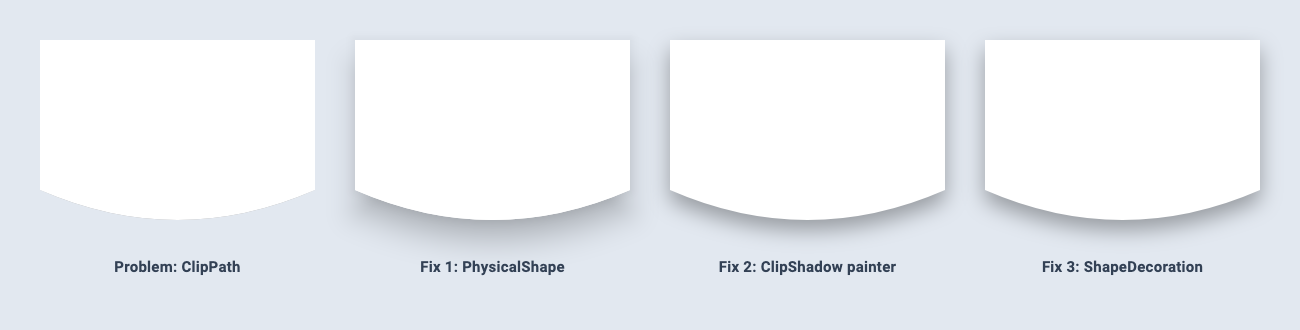
You build a nice custom shape with ClipPath, add a BoxShadow so it lifts off the background, and the shadow is gone. This is one of the most common custom-shape problems in Flutter. The cause is simple, and so are the fixes once you see the cause.
The broken version
class WaveClipper extends CustomClipper<Path> {
  const WaveClipper();

  @override
  Path getClip(Size size) {
    final w = size.width;
    final h = size.height;
    return Path()
      ..lineTo(0, h * 0.75)
      ..quadraticBezierTo(w / 2, h * 1.05, w, h * 0.75)
      ..lineTo(w, 0)
      ..close();
  }

  @override
  bool shouldReclip(WaveClipper oldClipper) => false;
}

// The shadow never shows up:
ClipPath(
  clipper: const WaveClipper(),
  child: Container(
    height: 200,
    decoration: const BoxDecoration(
      color: Colors.white,
      boxShadow: [BoxShadow(color: Color(0x55000000), blurRadius: 18, offset: Offset(0, 10))],
    ),
  ),
)
Why it happens
There are actually two problems here:
- A shadow is always painted outside the shape. That's what makes it visible.
ClipPaththrows away every pixel outside its path, so the shadow is the first thing to go. - The shadow has the wrong shape anyway.
BoxShadowon aBoxDecorationfollows the rectangle of theContainer, not your curve. Even if you moved it outside the clip, you'd get a rectangular shadow under a curved shape.
So the fix has to do two things: paint the shadow outside the clip, and build it from the same path.
Fix 1: PhysicalShape (least code)
PhysicalShape takes a CustomClipper<Path> and paints a Material elevation shadow from that path, then optionally clips its child to it:
PhysicalShape(
  clipper: const WaveClipper(),
  color: Colors.white,
  elevation: 8,
  shadowColor: Colors.black,
  clipBehavior: Clip.antiAlias,
  child: const SizedBox(height: 200, width: double.infinity),
)
Your existing clipper works unchanged. Two things to know:
- Set
clipBehavioryourself. It defaults toClip.none, which paints the shape and shadow but lets the child overflow the curve. - You control elevation and colour, not blur or offset. The shadow follows Material's elevation model. If a designer handed you exact
blurRadiusandoffsetvalues, use fix 2 or 3.
Fix 2: paint the shadow behind the clip
Put a CustomPaint around the ClipPath. A CustomPaint's painter draws behind its child, and since the painter sits outside the clip, its shadow survives:
import 'package:flutter/foundation.dart';
import 'package:flutter/material.dart';

class ClipShadowPainter extends CustomPainter {
  ClipShadowPainter({required this.clipper, required this.shadows});
  final CustomClipper<Path> clipper;
  final List<BoxShadow> shadows;

  @override
  void paint(Canvas canvas, Size size) {
    final path = clipper.getClip(size);
    for (final shadow in shadows) {
      canvas.drawPath(path.shift(shadow.offset), shadow.toPaint());
    }
  }

  @override
  bool shouldRepaint(ClipShadowPainter oldDelegate) =>
      oldDelegate.clipper.runtimeType != clipper.runtimeType ||
      clipper.shouldReclip(oldDelegate.clipper) ||
      !listEquals(oldDelegate.shadows, shadows);
}

class ClipShadow extends StatelessWidget {
  const ClipShadow({
    super.key,
    required this.clipper,
    required this.shadows,
    required this.child,
  });

  final CustomClipper<Path> clipper;
  final List<BoxShadow> shadows;
  final Widget child;

  @override
  Widget build(BuildContext context) {
    return CustomPaint(
      painter: ClipShadowPainter(clipper: clipper, shadows: shadows),
      child: ClipPath(clipper: clipper, child: child),
    );
  }
}
Usage:
ClipShadow(
  clipper: const WaveClipper(),
  shadows: const [
    BoxShadow(color: Color(0x55000000), blurRadius: 18, offset: Offset(0, 10)),
  ],
  child: Container(height: 200, color: Colors.white),
)
How it works:
BoxShadow.toPaint()returns aPaintwith the shadow's colour and a Gaussian blur that matches itsblurRadius, the same blurBoxDecorationuses.path.shift(shadow.offset)moves the shadow by its offset.shouldRepaintchecks the clipper the same wayClipPathdecides whether to re-clip: a different clipper type, orshouldReclipreturningtrue. Comparing the clipper instances directly would repaint on every rebuild, because each build creates a new clipper object.
Limitation: spreadRadius is ignored. Growing an arbitrary path outward isn't a simple operation, so if you need spread, use fix 3.
Fix 3: ShapeDecoration with a ShapeBorder (most flexible)
ShapeDecoration draws shadows for any ShapeBorder. Wrap your existing clipper in a tiny ShapeBorder and you can reuse it everywhere:
class ClipperBorder extends ShapeBorder {
  const ClipperBorder(this.clipper);
  final CustomClipper<Path> clipper;

  @override
  EdgeInsetsGeometry get dimensions => EdgeInsets.zero;

  @override
  Path getOuterPath(Rect rect, {TextDirection? textDirection}) =>
      clipper.getClip(rect.size).shift(rect.topLeft);

  @override
  Path getInnerPath(Rect rect, {TextDirection? textDirection}) =>
      getOuterPath(rect, textDirection: textDirection);

  @override
  void paint(Canvas canvas, Rect rect, {TextDirection? textDirection}) {}

  @override
  ShapeBorder scale(double t) => this;
}
Then:
Container(
  height: 200,
  clipBehavior: Clip.antiAlias,
  decoration: const ShapeDecoration(
    shape: ClipperBorder(WaveClipper()),
    color: Colors.white,
    shadows: [
      BoxShadow(color: Color(0x55000000), blurRadius: 18, offset: Offset(0, 10)),
    ],
  ),
  child: const Center(child: Text('Your content')),
)
Why this one keeps the shadow even though it clips: Container applies clipBehavior to its child only, inside the decoration. The decoration, shadow included, is painted outside that clip.
Extra benefits:
spreadRadiusworks.ShapeDecorationbuilds each shadow by callinggetOuterPathwith the rect inflated by the spread, and your clipper rebuilds the path for that bigger size.- Material widgets accept it.
Material(shape: ClipperBorder(...), elevation: 8),Card(shape: ...)andInkWell(customBorder: ...)all take aShapeBorder, so ripples and elevation follow your curve too.
Which fix should you use?
| PhysicalShape | ClipShadow painter | ShapeDecoration + ClipperBorder | |
|---|---|---|---|
| Extra code | None | ~45 lines (reusable) | ~20 lines (reusable) |
| Blur and offset control | No (elevation only) | Yes | Yes |
spreadRadius |
n/a | Ignored | Supported |
| Multiple shadows | No | Yes | Yes |
| Works with Material / InkWell | n/a | No | Yes |
- Just want it to look lifted? Use
PhysicalShape. - Matching exact shadow values from a design? Use
ShapeDecoration+ClipperBorder. - Can't use a decoration (for example, the clipped child is a third-party widget that brings its own layout)? Use
ClipShadow.
Still missing?
The shadow is cut off at the edges. Something above your widget is clipping: a ListView clips to its viewport, and Card, ClipRRect and Scaffold bodies can clip too. Leave padding around the shape at least as big as blurRadius plus the offset.
Shadows don't appear in golden tests. flutter_test sets debugDisableShadows = true by default, which replaces shadows with solid, unblurred blocks so goldens stay stable across versions. Set it to false at the start of a golden test and back to true before the test ends. If you leave it changed, the test fails its post-test checks.
Related articles
Explore Our Projects
Beyond the shape tools — two more things we build and use every day. Free to try, no signup.
Keyboard Arena
Typing practice that plays like a game
Real-time WPM tests, mechanical switch audio, A-Z finger drills and 40+ structured lessons. Race a ghost of your best run instead of grinding random words.
- ✓ Live WPM & Accuracy
- ✓ Mechanical Switch Audio
- ✓ 40+ Guided Lessons
Flutter Log Explorer
Finally, Flutter logs you can read
Zero-config, real-time log capture from the Debug Adapter and Dart VM Service, with smart classification, filters and deduplication — all inside VS Code.
- ✓ Zero-Config Capture
- ✓ Smart Filters & Search
- ✓ Noise-Free Deduplication
Ready to Design Your Own Shapes?
Open the editor and start creating professional Flutter CustomPainter code visually.
Open the Editor